Recording App Tutorial
Learn how to build a simple recording app using HTML, CSS, and JavaScript
Tutorial Steps
Download Tutorial
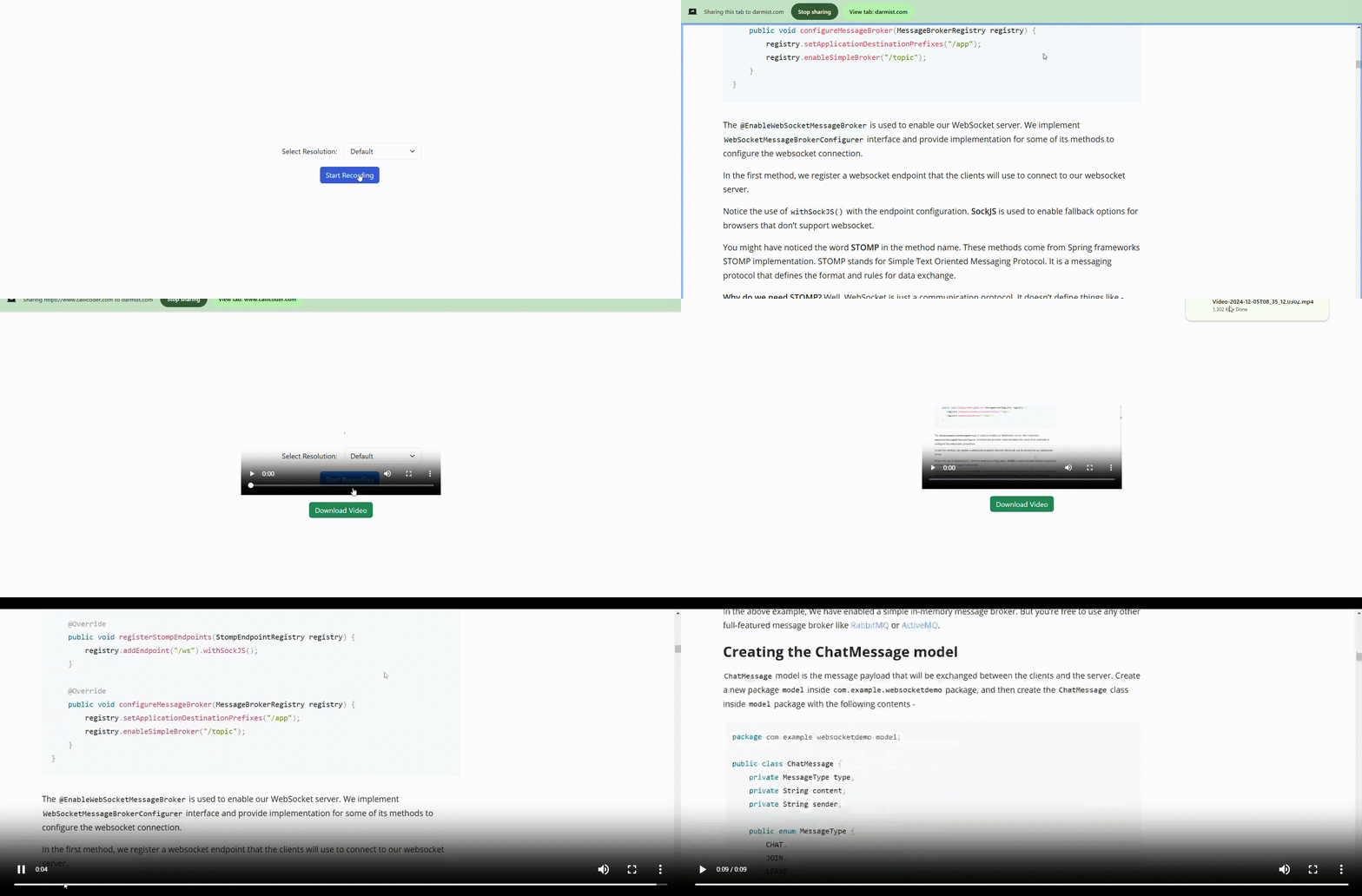
Step 1 - Setup Project
Create a project folder and include three files: index.html, style.css, and script.js.
Your Application Folder Structure will be like:
  Record
    ├── index.html
    ├── script.js
    ├── style.css
Step 2 - HTML Structure
Add the following code to your index.html:
<!DOCTYPE html>
<html lang="en">
<head>
<meta charset="UTF-8">
<meta name="viewport" content="width=device-width, initial-scale=1.0">
<title>Screen Recorder</title>
<link rel="stylesheet" href="style.css">
<link href="https://cdn.jsdelivr.net/npm/bootstrap@5.3.3/dist/css/bootstrap.min.css" rel="stylesheet" integrity="-QWTKZyjpPEjISv5WaRU9OFeRpok6YctnYmDr5pNlyT2bRjXh0JMhjY6hW+ALEwIH" crossorigin="anonymous">
</head>
<body>
<div id="controls">
<div class="d-flex align-items-center">
<label for="resolution" class="form-label mb-0 me-2" style="width: -webkit-fill-available;">Select Res:</label>
<select class="form-select" id="resolution">
<option value="default">Default</option>
<option value="hd">HD (1280x720)</option>
<option value="fullhd">Full HD (1920x1080)</option>
<option value="4k">4K (3840x2160)</option>
</select>
</div>
<button class="btn btn-primary mt-3" id="startBtn">Start Recording</button>
<button class="btn btn-secondary mt-3" id="stopBtn" style="display:none;">Stop Recording</button>
</div>
<div id="downloadSection">
<video id="recordedVideo" controls></video>
<a class="btn btn-success mt-3" id="downloadLink" style="display:none;">Download Video</a>
</div>
<script src="script.js"></script>
<script src="https://cdn.jsdelivr.net/npm/bootstrap@5.3.3/dist/js/bootstrap.bundle.min.js" integrity="-YvpcrYf0tY3lHB60NNkmXc5s9fDVZLESaAA55NDzOxhy9GkcIdslK1eN7N6jIeHz" crossorigin="anonymous"></script>
</body>
</html>
Step 3 - CSS Styling
Add the following styles to your style.css:
/* Styling for the controls container */
#controls {
z-index: 1;
margin: 20px;
text-align: center;
position: absolute;
left: 50%;
top: 50%;
transform: translate(-50%, -50%);
}
/* Styling for the download section, hidden initially */
#downloadSection {
z-index: 2;
display: none;
text-align: center;
position: absolute;
left: 50%;
top: 50%;
transform: translate(-50%, -50%);
}
/* Styling for the recorded video display */
#recordedVideo {
display: none;
margin-top: 20px;
margin: 20px;
max-width: 450px;
max-height: 450px;
}
Step 4 - JavaScript Logic
Use the following code in your script.js:
let mediaRecorder;
let recordedChunks = [];
let screenStream;
const startBtn = document.getElementById('startBtn');
const stopBtn = document.getElementById('stopBtn');
const recordedVideo = document.getElementById('recordedVideo');
const downloadLink = document.getElementById('downloadLink');
const downloadSection = document.getElementById('downloadSection');
const resolutionSelect = document.getElementById('resolution');
startBtn.addEventListener('click', async () => {
let constraints = { video: true, audio: true };
switch (resolutionSelect.value) {
case 'hd':
constraints.video = { width: { ideal: 1280 }, height: { ideal: 720 } };
break;
case 'fullhd':
constraints.video = { width: { ideal: 1920 }, height: { ideal: 1080 } };
break;
case '4k':
constraints.video = { width: { ideal: 3840 }, height: { ideal: 2160 } };
break;
}
screenStream = await navigator.mediaDevices.getDisplayMedia(constraints);
mediaRecorder = new MediaRecorder(screenStream);
mediaRecorder.ondataavailable = event => {
if (event.data.size > 0) {
recordedChunks.push(event.data);
}
};
mediaRecorder.onstop = () => {
const blob = new Blob(recordedChunks, { type: 'video/mp4' });
const url = URL.createObjectURL(blob);
recordedVideo.src = url;
recordedVideo.style.display = 'block';
downloadSection.style.display = 'block';
downloadLink.href = url;
downloadLink.download = 'Recorded-Video-' + new Date().toISOString() + '.mp4';
downloadLink.style.display = 'unset';
downloadLink.textContent = 'Download Video';
recordedChunks = [];
screenStream.getTracks().forEach(track => track.stop());
};
mediaRecorder.start();
startBtn.style.display = 'none';
stopBtn.style.display = 'unset';
});
stopBtn.addEventListener('click', () => {
mediaRecorder.stop();
stopBtn.style.display = 'none';
startBtn.style.display = 'unset';
});
Step 5 – Your Completed Code looks like:
Run following Command to create data-service to Implement Logic for Transaction:
<!DOCTYPE html>
<html lang="en">
<head>
    <meta charset="UTF-8">
    <meta name="viewport" content="width=device-width, initial-scale=1.0">
    <title>Screen Recorder</title>
    <style>
        /* Styling for the controls container */
        #controls {
            z-index: 1;
            margin: 20px;
            text-align: center;
            position: absolute;
            left: 50%;
            top: 50%;
            transform: translate(-50%, -50%);
            -webkit-transform: translate(-50%, -50%);
        }
        /* Styling for the download section, hidden initially */
        #downloadSection {
            z-index: 2;
            display: none;
            text-align: center;
            position: absolute;
            left: 50%;
            top: 50%;
            transform: translate(-50%, -50%);
            -webkit-transform: translate(-50%, -50%);
        }
        /* Styling for the recorded video display */
        #recordedVideo {
            display: none;
            margin-top: 20px;
            margin: 20px;
            max-width: 450px;
            max-height: 450px;
        }
    </style>
    <!-- Bootstrap CSS for styling the page elements -->
    <link href="https://cdn.jsdelivr.net/npm/bootstrap@5.3.3/dist/css/bootstrap.min.css" rel="stylesheet" integrity="sha384-QWTKZyjpPEjISv5WaRU9OFeRpok6YctnYmDr5pNlyT2bRjXh0JMhjY6hW+ALEwIH" crossorigin="anonymous">
</head>
<body>
    <!-- Controls for starting and stopping the screen recording -->
    <div id="controls">
        <div class="d-flex align-items-center">
            <!-- Resolution selection dropdown -->
            <label for="resolution" class="form-label mb-0 me-2" style="width: -webkit-fill-available;">Select Resolution:</label>
            <select class="form-select" id="resolution">
                <option value="default">Default</option>
                <option value="hd">HD (1280x720)</option>
                <option value="fullhd">Full HD (1920x1080)</option>
                <option value="4k">4K (3840x2160)</option>
            </select>
        </div>
        <!-- Button to start recording -->
        <button class="btn btn-primary mt-3" id="startBtn">Start Recording</button>
        <!-- Button to stop recording (hidden initially) -->
        <button class="btn btn-secondary mt-3" id="stopBtn" style="display:none;">Stop Recording</button>
    </div>

    <!-- Section to show the recorded video and download button -->
    <div id="downloadSection">
        <video id="recordedVideo" controls></video>
        <a class="btn btn-success mt-3" id="downloadLink" style="display:none;">Download Video</a>
    </div>

    <script>
        // Declare variables to hold media recorder, recorded video chunks, and stream
        let mediaRecorder;
        let recordedChunks = [];
        let screenStream;

        // References to HTML elements
        const startBtn = document.getElementById('startBtn');
        const stopBtn = document.getElementById('stopBtn');
        const recordedVideo = document.getElementById('recordedVideo');
        const downloadLink = document.getElementById('downloadLink');
        const downloadSection = document.getElementById('downloadSection');
        const resolutionSelect = document.getElementById('resolution');

        // Event listener for the start recording button
        startBtn.addEventListener('click', async () => {
            // Define constraints for the media stream (video and audio)
            let constraints = { video: true, audio: true };

            // Adjust constraints based on the selected resolution
            switch (resolutionSelect.value) {
                case 'hd':
                    constraints.video = { width: { ideal: 1280 }, height: { ideal: 720 } };
                    break;
                case 'fullhd':
                    constraints.video = { width: { ideal: 1920 }, height: { ideal: 1080 } };
                    break;
                case '4k':
                    constraints.video = { width: { ideal: 3840 }, height: { ideal: 2160 } };
                    break;
            }

            // Prompt the user to select what they want to share (screen, window, or tab)
            screenStream = await navigator.mediaDevices.getDisplayMedia(constraints);
            // Create a MediaRecorder instance to record the screen stream
            mediaRecorder = new MediaRecorder(screenStream);

            // Event handler when data is available (chunks of video)
            mediaRecorder.ondataavailable = event => {
                if (event.data.size > 0) {
                    recordedChunks.push(event.data);  // Store the recorded chunks
                }
            };

            // Event handler when recording is stopped
            mediaRecorder.onstop = () => {
                // Combine the recorded chunks into a single video file
                const blob = new Blob(recordedChunks, { type: 'video/mp4' });
                const url = URL.createObjectURL(blob); // Create a URL for the recorded video

                // Set the recorded video source and display it
                recordedVideo.src = url;
                recordedVideo.style.display = 'block'; // Show the recorded video
                downloadSection.style.display = 'block'; // Show the download section

                // Set up the download link for the video
                downloadLink.href = url;
                downloadLink.download = 'Recorded-Video-" + new Date().toISOString() + '.mp4';
                downloadLink.style.display = 'unset'; // Show the download link
                downloadLink.textContent = 'Download Video'; // Set the text for the download button

                recordedChunks = []; // Reset the recorded chunks array

                // Stop all tracks of the screen stream to end screen sharing
                screenStream.getTracks().forEach(track => track.stop());
            };

            // Start recording
            mediaRecorder.start();
            // Hide the start button and show the stop button
            startBtn.style.display = 'none';
            stopBtn.style.display = 'unset';
        });

        // Event listener for the stop recording button
        stopBtn.addEventListener('click', () => {
            // Stop the media recorder and recording process
            mediaRecorder.stop();
            // Hide the stop button and show the start button
            stopBtn.style.display = 'none';
            startBtn.style.display = 'unset';
        });
    </script>

    <!-- Bootstrap JS for additional functionality -->
    <script src="https://cdn.jsdelivr.net/npm/bootstrap@5.3.3/dist/js/bootstrap.bundle.min.js" integrity="sha384-YvpcrYf0tY3lHB60NNkmXc5s9fDVZLESaAA55NDzOxhy9GkcIdslK1eN7N6jIeHz" crossorigin="anonymous"></script>
</body>
</html>
Your Recorder App is ready now. Run the index.html file and try to record